Notepad Writer: Capturing Authentic Handwriting in Your Designs
There's a particular warmth to handwritten notes—a quick journal entry, a grocery list, or a margin scribble that digital text often misses. We've all seen fonts that try to mimic handwriting but end up feeling stiff or overly stylized. The goal is often to find something that doesn't feel like a font at all, but like genuine, relaxed penmanship. This is the space where Notepad Writer lives. It's a premium font designed to bridge the gap between the convenience of digital typography and the authentic charm of real handwriting.
A Font That Feels Like a Conversation
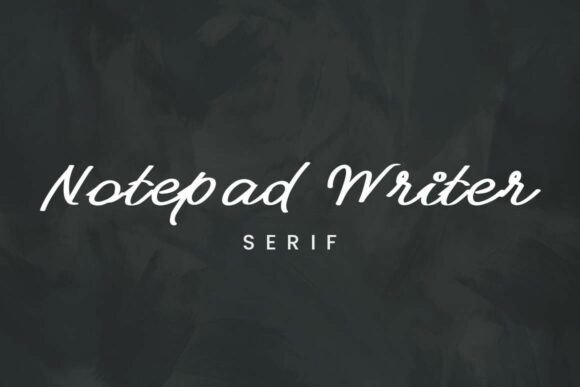
What immediately sets Notepad Writer apart is its personality. It doesn't aim for perfect, calligraphic elegance. Instead, it captures the quick, fluid motion of someone jotting down thoughts on a notepad or in the margins of a book. The strokes are thin and consistent, which is a critical detail for a handwritten font. This consistency ensures that it remains remarkably legible at small sizes, a common pitfall for many script fonts that become an unreadable tangle of loops and connections.
This typeface feels approachable and human. It's the visual equivalent of a friendly, casual tone of voice. The slight imperfections and natural flow give it an authenticity that rigid, geometric typefaces cannot replicate. For a designer, this means it can instantly inject a layer of personality and approachability into a project, making the viewer feel a more direct, personal connection to the content.
Practical Applications for Real-World Projects
Understanding where a creative font like this works best is key to using it effectively. It's not a display font for massive headlines demanding attention, nor is it a serif font for long-form body text. Its strength lies in specific, impactful applications where authenticity is the goal.
Consider these scenarios:
- Brand Identity & Logo Design: For brands that want to project warmth, craftsmanship, and personal service, Notepad Writer can be a cornerstone. It works beautifully for a boutique bakery, a personal coach, a handmade jewelry shop, or a local café. It suggests that a real person is behind the brand, not a faceless corporation.
- Editorial & Publishing Design: In magazines, blogs, or books, it can be used for pull quotes, chapter titles, or annotations to break the monotony of standard body text. It adds a layer of editorial voice and visual interest, guiding the reader's eye in a more organic way.
- Packaging Design: On a product label or box, a handwritten element can communicate "small batch," "made with care," or "artisanal." Notepad Writer is perfect for adding that personal touch to packaging without sacrificing the legibility of key information.
- Digital & Social Media Graphics: For web design, email headers, or social media graphics, this font can make content feel more immediate and personal. It's ideal for quotes, call-to-action phrases, or testimonials where you want the words to feel spoken by a real person.
Using Notepad Writer with Intention
Choosing the right font pairing is where the real design work happens. Notepad Writer's casual nature means it needs a stable, clean counterpart to create balance and ensure overall readability. A common and effective strategy is to pair it with a simple sans serif font or a classic, readable serif font.
For example, using Notepad Writer for a header like "Our Story" paired with a neutral sans serif like Lato or Open Sans for the paragraph text creates a clear hierarchy. The handwritten element draws the eye and sets a friendly tone, while the sans serif provides a clean, easy-to-read foundation for longer content. Avoid pairing it with other highly decorative or script fonts, as this will create visual chaos and undermine its subtle charm.
Before committing to any commercial font, always test it within your specific design context. Set your actual headlines and subheadings. Check the legibility at the intended size, both on screen and in print if applicable. Review the full character set—does it include the punctuation, numbers, and accented characters you need? For any commercial project, confirming the font's licensing is a non-negotiable step. Most reputable design assets marketplaces provide clear licensing information, so you can use the font with confidence in your client work or business materials.
Ultimately, a tool like Notepad Writer is about adding a layer of humanity to your digital layouts. It’s a modern typography solution for a problem we all recognize: how to keep digital communication feeling personal, warm, and genuinely crafted. When used thoughtfully, it becomes more than just a typeface; it becomes a voice.